Connect. Ask. Track.
Plaivra
Connect Plaivra to ChatGPT with limited permissions. ChatGPT uses task-specific context and authorized tools; Plaivra stores, tracks, visualizes, and lets you correct the result.
Connect Plaivra -> choose limited permissions -> ask ChatGPT -> track the tool-confirmed result.
Manual execution and correction controls stay available. Consequential or destructive actions still require explicit confirmation.
Connect Plaivra
Task-specific permissions
Ask ChatGPT
Minimum relevant context
Plaivra tracks
Saved tools, visuals, control
Product map
Five domains, one continuous record
Today
The next useful workout, nutrition, and daily-execution actions.
Train
Plans, active sessions, history, and direct corrections.
Eat
Food logging, meal planning, groceries, and nutrition progress.
Progress
Accessible charts, measurements, records, and trends.
Settings
Connections, permissions, privacy, export, and deletion.
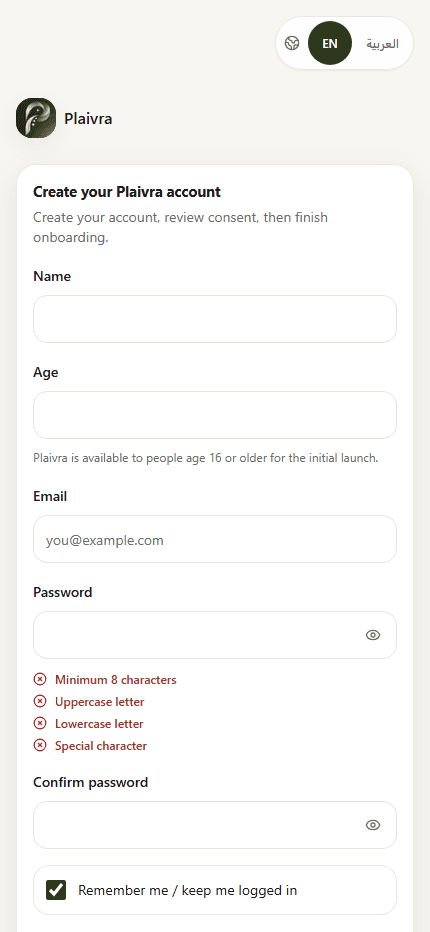
This is a capability map, not sample user data. The real registration screen below comes from a local production build; member-data screenshots remain gated on a verified release and synthetic reviewer account.
Real product surface
Consent and privacy before tracking
This is Plaivra's implemented account-creation screen. It makes age eligibility, required agreements, and privacy visible before any fitness context is entered.
Create accountScoped access
ChatGPT can use only the Plaivra areas and actions you permit, with server-side enforcement.
User controls data
Privacy, legal, health disclaimer, and consent are accessible before account creation.
Manual correction stays
Manual entry remains available for fallback, correction, repeat, and advanced control.
Connect with limited access
Choose the Plaivra areas ChatGPT may read or change, then narrow or revoke access whenever you want.
Ask ChatGPT naturally
ChatGPT reads only the authorized context needed for your workout, nutrition, progress, or daily-execution task.
Track the saved result
Authorized Plaivra tools store successful changes directly, with stable history and clear status.
Edit and correct anytime
Direct Plaivra controls remain available for execution, fallback, correction, and privacy.
FAQ
Before you create an account
How old do I need to be?
Plaivra is available to people age 16 or older for the initial launch. Existing accounts with missing or conflicting age information are reviewed without silent deletion.
Does ChatGPT receive my full profile?
No. Plaivra shares only the task-specific context covered by the permissions you granted.
Can I correct a saved result?
Yes. Tool-created plans and logs use normal Plaivra screens with direct edit, correction, export, and deletion controls.
Platform availability
Truthful launch status
Plaivra's web app is the launch surface. ChatGPT connection availability depends on completed platform review. Native iOS and Android apps are planned, not currently available.
Web app
Initial public launch surface
ChatGPT, iOS, Android
Review or future delivery required
Start with consent, then onboarding
Create an account, complete essential setup, connect Plaivra to ChatGPT, and choose permissions for your first task.